eHealth OR Management
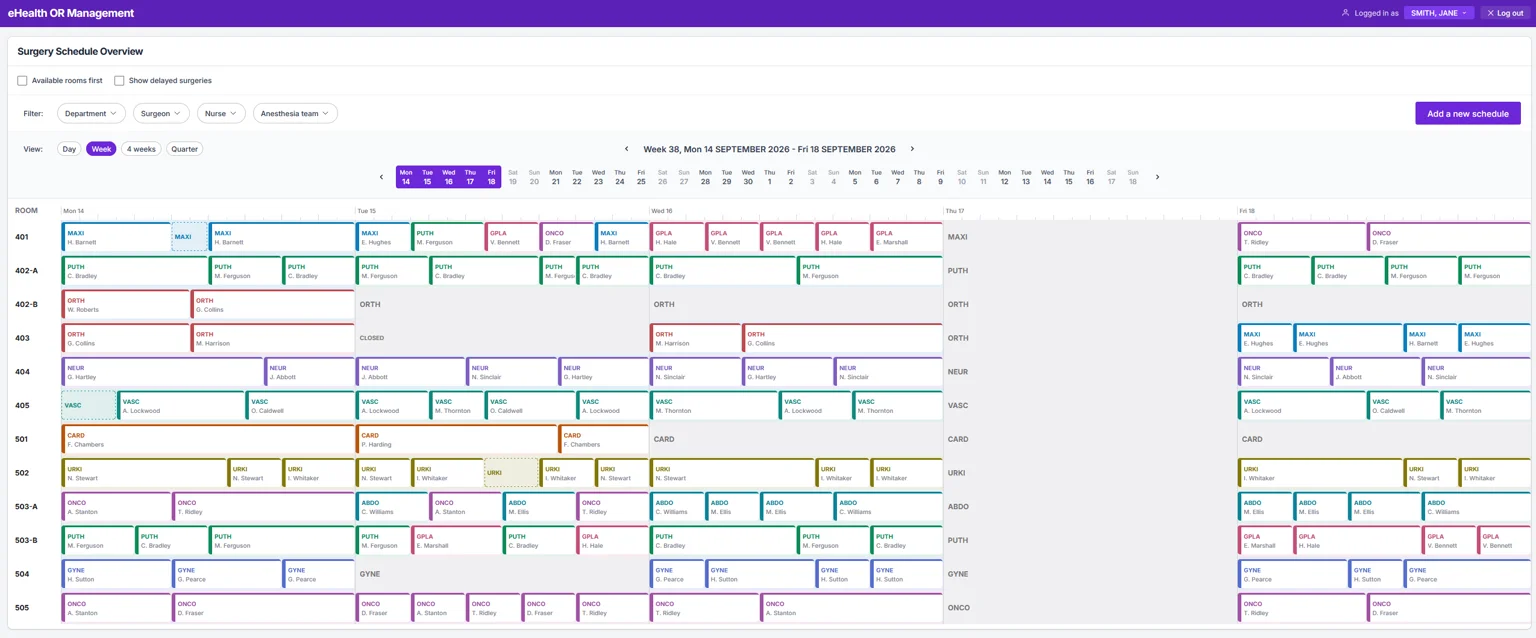
The Brief
From the brief I mainly took 2 things: my task and the user needs.
My task
Design the core experience for the Surgery Schedule Manager. Focus on:
- The weekly overview
- Adding a new surgery
User needs
- Overview timeframes: 1 week, 4 weeks, quarter.
- Overview of rooms, surgeons, nurses, anesthesia teams.
- Visible room names, week numbers and days.
- Operating department in schedules: operating doctor, service or anesthesia team need.
- Overview of vacated, reassigned, closed, non-usable rooms.
- Make changes on operating room basis
- View specific day room info and can make changes like changing working hours or closing the room.
For the prototype I decided to use Claude Code instead as it enables me to build prototypes with more interactivity and in the same time me to provide more value for the client.
I removed “Ensure optimal use of rooms.” from the needs list as it is implicit.
Starting Point
What is an Overview and why I chose to focus on the Day Overview at first
My general idea of an Overview is that it needs to fit the screen. When you scroll, it loses that function and is a
The main thing was the information density. Being able to show that much infomation to match the user needs and actually give good overview on one screen needs more space - so less cells/days to display. I also stumbled upon the Nortal eHealth page which also had a day view which I used extensively for my own design and choices so it can also work with whatever Nortal is already building. Me having a cold and foggy head at that time played a role too.
From the excel example you can actually get an overview of the schedule. But you miss a lot of detail. If you add all the detail, you also lose something - the simplicity of the excel-like overview.
Research & Discovery
Started with simple desktop research into competitors
Did a quick desktop research into Nortal, competitors, the category itself and into similar tools in completely other categories. As part of the research in this project I also collected feedback from an eye doctor/surgeon and the Head Nurse of the Operating Theatre Service at TÜK (Tartu Ülikooli Kliinikum/Tartu University Hospital)
Will bring out the main things that pushed the needle in this project.
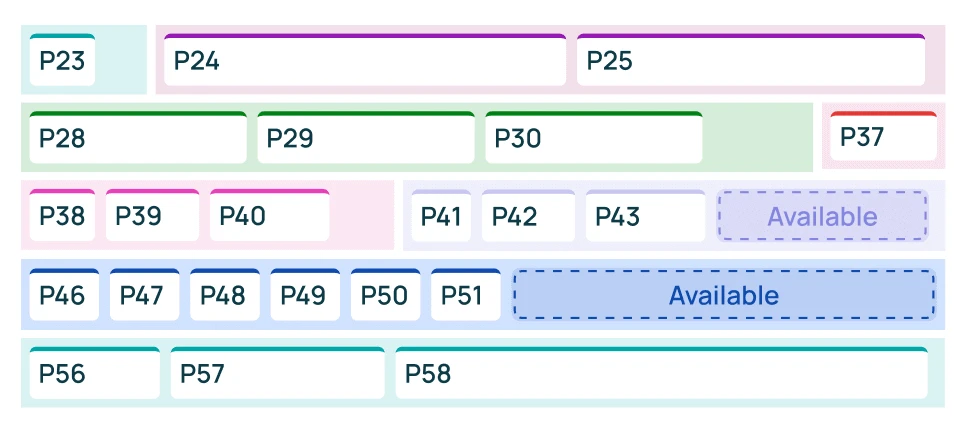
This Opmed product visualisation directly translated to multiple design decisions.
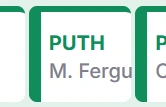
The main card having a thick color line to highlight certain department in addition to the abbreviation. Adding a vertical thicker line emphasizes the start of a of said card and brings the card out better when filtering.

Having a thin dashed outline to mark availability. This differantiates a key property of the card and enables the user to find and fill available slots quickly. It is also written to make it more explicit.
- 1. Department
- 2. Surgeon name
Having a card reference. (e.g. P40) The key is to have enough differentiating details on the card to make it referrable. Adding a separate system referral code on the card is unnecessary in most cases.
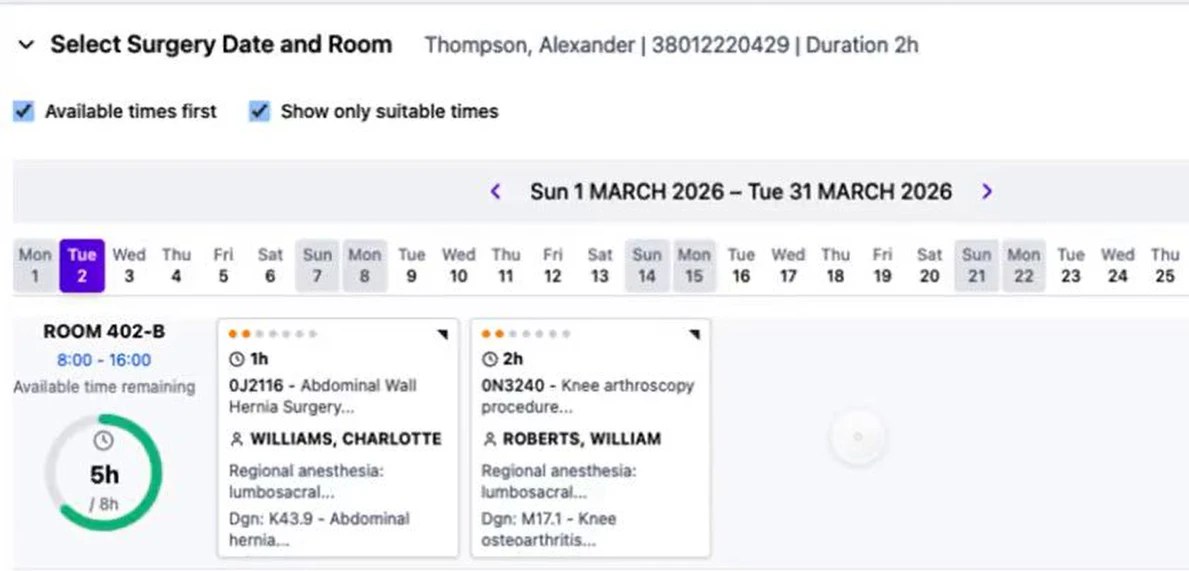
Connecting my design to the real thing.
This can be a risky move, as it simplifies my Nortal home assignment but it makes sense to do it. If this is the actual project this assignment refers to then it enables it to be directly linked to other design decisions already made in this project. Also the overall look and feel can be much closer to the already existing designs.
From these screens I reused all the information and the detail view itself when hovered to show the extended info of the surgery as the card can’t convey all the info. More info is visible on the day view as this can hold a lot more info comparted to the week view. Current choice of information shown is based on uncertainty of certain limitations. If I knew the limited screen sizes they use I would optimize the content to those screen sizes. This would probably enable me to add more info so the need for using the detailed view would be lessened.
Interview / Feedback
Got really lucky with connections.
As a stroke of faith, my significant other mentioned she directly knew the “Surgery Schedule Manager” in Tartu University Hospital. I asked feedback on my Day overview from her and got some valuable insights into the inner workings of this specific role.
What I learned (was specific to Tartu University Hospital) so everything doesn’t apply to the private hospital but I took it as it would for this design task scope to be able to also include some user research into the design process.
A contact-transmissible infection should immediately stand out as a warning, without requiring the user to click into the operation. We sometimes have problems with this as well, and then we are very unhappy with the department because the information was not noticed.
Being able to see Contact-transmissible infections on the card is critical to communicate this info fast and avoid them spreading.
It is correct that the patient’s name is not immediately visible and is only shown after clicking on the case.
It feels good to sometimes get good feedback about your decisions. Although being right or wrong both enable me to get to the same spot in next stage.
Surgeons’ special requirements should ideally be visible about a week in advance. For example, something may be broken or there may be a supply/delivery issue. This would give the team time to find an alternative or replacement.
These are some of the specifics about surgery you can’t really know in advance and having someone tell you about it is very valuable feedback.
In general, an empty slot is not intentionally left open. However, sometimes a slot may remain unfilled. An operating room standing empty represents a significant financial loss.
Rooms being filled is at the core of this design task and the OR system in general. You have to maximise the use of these rooms as they provide a lot of value to people.
Second person I contacted was a good friend who happens to be an eye doctor and a surgeon. He provided input for the research part so I could understand the surgeon perspective better. The Nortal’s surgeon room booking view was the perfect example to talk about on this topic.
Looking at the eHealth booking screen: this already seems pretty good.
This was direct reference to a Nortal eHealth screen. So well done Nortal. This was one small reason why I repurposed Nortal designs as well.
Glance value is probably what matters.
You should be able to get as much info easily with a glance without the need to focus on anywhere specific for a long time. So choices what to keep and what to remove are most important.
Maybe also whether it’s another department’s operation — sometimes one department has no room, so the operation is done in another department.
Having more flexibility with time and room choices enables the process to be more efficient. While predetermined slots enable stability.
What I skipped from all the feedback was the need for emergency operations, as it was not mentioned in the original brief and a solution for them is having a separate room that is already a solved problem. And having emergency operations in rooms with other planned operations makes the whole thing much more inefficient for everyone.
Results
I’m satisfied overall but have my concerns regarding some choices I made.
Overall I think, the prototype conveys well how I would want the Surgery Schedule Manager’s main views to look and feel like. They give a well balanced overview of things in different timeframes and enable them to work within a single screen. It can be made more efficient and useful when the actualy limitations of the role are explored.
There are still missing or misunderstood within this project, but that is fine. It is always a living process and for that you need the user/client in the loop to make it as close to perfect as possible.
Learnings
Don’t do work while ill
Doing work while ill often leads to doing the work a second time once you don’t feel ill anymore. Asking for reschedule is an option.
AI prototypes lead to happy accidents.
Finding out that the drag-drop feature updates times when dragging a surgery around was one of those happy accidents. An AI mistake is also a happy accident pushing me back to Figma.
No time to make it simple(st)
Even though I added complexity and worked it down to a simpler version there is no time to make it the simplest in this scope.
AI disclaimer.
- No AI was used to write or edit this case study. Any mistakes can be only attributed to a human.
- AI was mostly used to synthesize research info and do part of the search function of the research.
- AI was also used to bounce back ideas as this has the benefit of working as a team and to not get stuck on technicalities.
- Claude Code was used to create the prototype based on Figma screens.